Looking for a Sudowrite alternative? Sudowrite is excellent at expanding fiction prose, but it runs on credits that run out, and it only writes: it doesn't design your cover or lay out your book. The most complete all-in-one alternative is Scriptum Writer Studio: it assists you without writing your novel for you, remembers your entire book, formats it, and gets it ready to upload to Amazon KDP — at a flat price from €7.25/month.
Sudowrite has earned its reputation the hard way. Among fantasy, horror and science-fiction writers it's almost a default pick: it expands scenes with real craft, digs into emotion, and proposes continuations that respect your tone. If you write fiction and live off your prose, it's a serious tool. But if you've landed here, it's because something isn't quite adding up: maybe that credit meter dropping every time you generate is starting to worry you, or maybe you want more than "writing" — planning, cover design, interior layout and a straight line to Amazon without jumping between five different programs. In this comparison we'll be honest about what Sudowrite does brilliantly, where it falls short once you need the whole book done, and which alternative fits best depending on how you write.
Why look for a Sudowrite alternative
Let's start with what's fair: Sudowrite does its job very well. Its own model, Muse, is fine-tuned on published novels and understands dialogue rhythm, pacing and genre conventions. Features like "Write," "Describe" or "Brainstorm" are quick to use, and its Story Bible feeds context into what it generates. For a writer who wants an AI that pushes their prose forward, it's a genuinely excellent tool. You can see it on its official website.
That said, there are four cracks that push a lot of people to look for a Sudowrite alternative:
- It runs on credits that run out. Sudowrite works through subscription plans with a credit balance that drops every time you generate text; the more powerful models burn through more. The result is a variable cost that's hard to predict: write a lot in a given month, and your balance evaporates, forcing you to upgrade.
- Its memory of your story is manual and partial. The Story Bible is useful, but you have to fill it in and maintain it by hand, and it behaves more like a reference sheet than an AI that truly remembers your manuscript. On a long novel, keeping it in sync becomes one more chore.
- It only writes. Sudowrite helps you draft, but that's where the road ends: it doesn't design your cover, it doesn't lay out the interior and it doesn't get your book ready to publish. For all of that you need two or three more tools.
- It nudges you to over-generate. A workflow built around producing prose tempts you to lean on the AI too heavily. And a novel written almost entirely by a machine reads flat and drags in voice — and rights — problems that Amazon KDP is policing more closely every year.
None of this makes Sudowrite "bad." It simply marks the gap a modern alternative can fill: predictable pricing, real memory of your whole book, the entire road to publication in one place, and an AI that assists you without taking the wheel.
Sudowrite solved the problem of generating prose. The 2026 problem is a different one: getting an AI that actually knows your story, respects your voice, and walks with you all the way to a file ready for Amazon — without a credit meter watching over your shoulder.
What a good Sudowrite alternative should have
Before comparing names, set the bar. A Sudowrite alternative worth having in 2026 should tick this checklist:
- Predictable, flat pricing. One flat fee you know in advance every month, with no credits running out mid-chapter.
- Bring your own key (BYOK). Connect your own AI provider and stay in control of the model and the spend — with the right provider, the AI itself can even cost you nothing.
- Real memory of your novel. Not a chatbot that forgets who's who, but an AI that knows your characters, your plots and everything you've already written, so it continues your story instead of a generic one.
- Genuinely all-in-one, through to publishing. Write + plan + design the cover + lay out the interior + export a file ready for KDP. The fewer programs you need, the less friction and the less money out the door.
- The author stays in charge. A tool that assists, suggests and strengthens your writing, but never tries to write the book for you. Your voice is what makes the novel yours.
By this yardstick, no tool is "the best" in the abstract: it depends on which boxes matter most to you. Let's see them at a glance. And if you want the full lay of the land, there's the broader comparison of the best AI tools for writing novels.
Comparison: Scriptum vs Sudowrite vs NovelCrafter
This table sums up the three most common options when someone is looking for a Sudowrite alternative. Prices are indicative as of July 2026 and may vary by region and promotions.
| Tool | Best for | Author control | Pricing model | Knows your novel? | Through to publishing |
|---|---|---|---|---|---|
| Scriptum | Finishing your novel and getting a file ready for KDP | Assistant only — Aura suggests, you decide | Flat rate, €7.99/month + VAT (BYOK can make the AI itself free) | Yes — World Bible + memory | Yes — cover, layout and KDP-ready export |
| Sudowrite | Expanding fiction prose and scenes | Assists, but built to encourage heavy generation | Credits that run out (~$10–59/month depending on plan) | Partial — Story Bible (manual) | No — writing only |
| NovelCrafter | Long sagas with technical control and your own API | Assistant, BYOK power-user tool | ~$4–14/month + your API usage | Yes — codex (manual) | Limited — exports the manuscript |
Scriptum: the all-in-one alternative that keeps you in control
If Sudowrite was built to generate prose, Scriptum Writer Studio was built to walk with you from the first word to a file ready for Amazon, without ever leaving the program. It's a complete studio: you write, plan, design the cover, lay out the interior and export — all in one place. You'll find the module-by-module tour in the complete Scriptum studio, but here are the four reasons it works so well as a Sudowrite alternative.

1. It assists you — it doesn't write for you. This is the core difference. Aura, Scriptum's AI, works in six modes (Normal, Writer, Editor, Proofreader, Ideas and Marketing) and, once memory is switched on, remembers your novel by meaning: you can ask it in chapter 40 about a detail from chapter 3 and it answers instantly, with no re-reading required. And if a fact isn't in its memory, it says so instead of making it up. You decide how much AI you want — from a light nudge to a draft you then rewrite yourself — but the book stays yours. We don't sell "write without writing"; we build a professional tool that respects the fact that the author is in charge.
2. A flat price, with no credits running out. This is where the contrast with Sudowrite really shows. Scriptum doesn't sell credits: you pay a flat rate of €7.99/month or €86.99/year (≈€7.25/month; VAT not included, calculated at checkout by country) with everything included, and you can cancel anytime. Prices are shown in euros, but payment is processed in USD, so your bank may apply a small currency conversion. And because it runs on BYOK (your own key), you choose between several providers — Claude, OpenAI, Gemini, Groq, Ollama, Local AI and OpenRouter: with Groq or OpenRouter's free models, the AI side of things can cost you nothing, and with Local AI everything runs on your own computer. Against Sudowrite's "pay for what you generate," here you know exactly what you're spending, with no meter watching over your shoulder.

3. One program for the whole process — offline, and your files stay yours. Writing, planning, cover design and interior layout live inside the same application, on the web or as a desktop app for Mac and Windows. It's an installable PWA that works without a connection, and every novel is saved as a local file on your own device: no forced cloud, no account holding your manuscript hostage. The interface (and Aura) also happen to work in five languages, including English and Spanish, so switching tools never means switching languages either. Where Sudowrite keeps you tied to its own servers and to writing alone, Scriptum keeps the whole process — and your files — under your control.
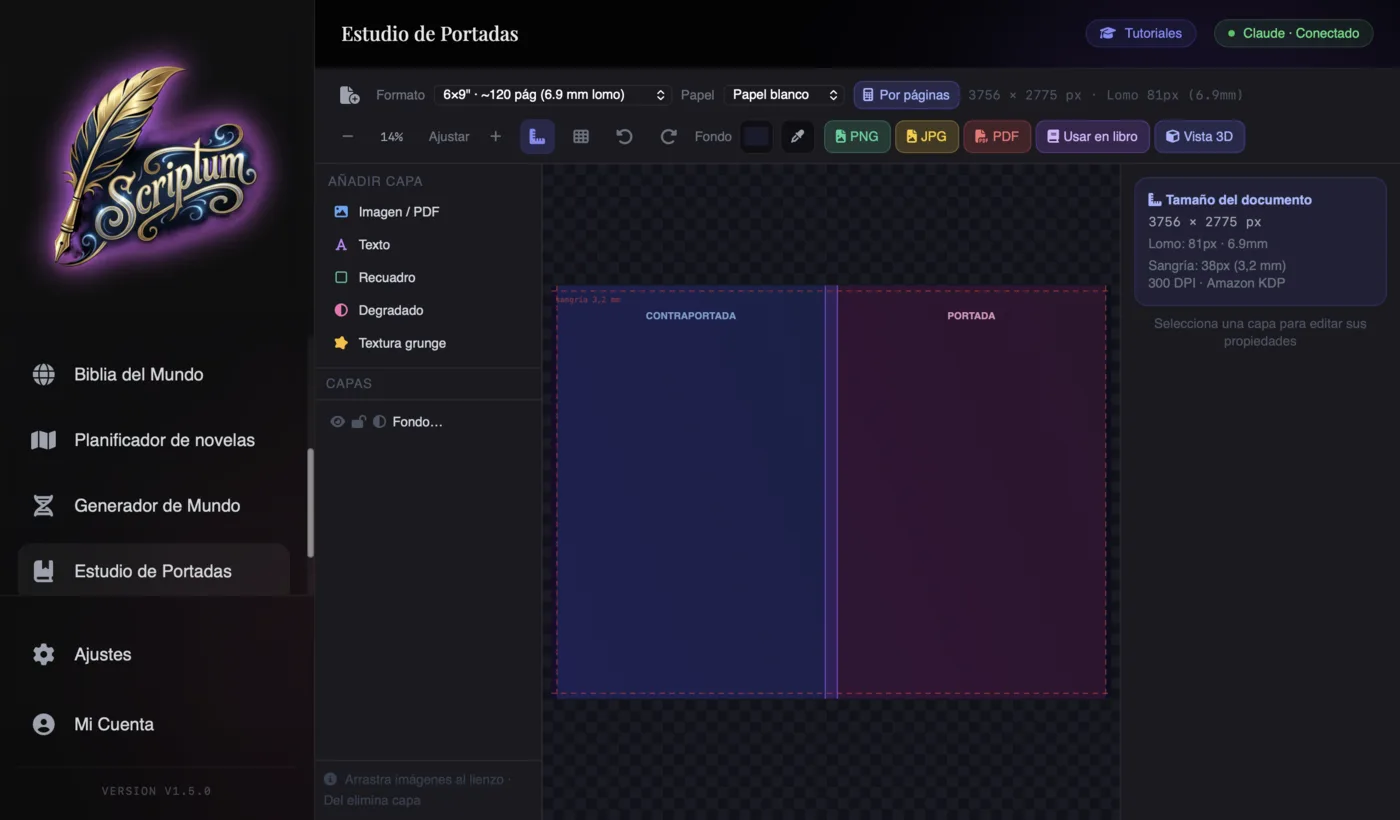
4. The whole road to a manuscript ready for KDP. Here's the most visible difference: Sudowrite writes, but it doesn't prepare or publish anything. Scriptum walks the rest of the road with you. The Cover Studio designs the cover with real KDP measurements and spine calculation based on your page count and paper type. The Publishing Studio lays out the interior with 18 templates (Classic, Fantasy, Thriller, Romance…) and KDP trim sizes like 6×9". And the exporter generates a PDF with embedded fonts, plus EPUB, DOCX and Markdown. One important nuance: Scriptum doesn't publish for you — the last step, creating your KDP account and uploading the files, is yours to take — but you arrive at Amazon with all the work already done. If you've never done this before, there's a guide on how to publish your novel on Amazon KDP.
So what does Sudowrite still defend best? Pure prose generation, plain and simple: if that's what you live on, its quality at expanding scenes is hard to match. But for the writer who wants to finish the whole novel, with an AI that actually knows their story and without paying by the word generated, Scriptum plays in a different league. And if you ever get stuck, you can also use AI to get past writer's block without letting it write for you.
Other Sudowrite alternatives depending on what you need
Scriptum is the all-in-one bet, but let's be honest: if your need is very specific, there are other options. Choose based on the job you want done, not the hype.
- NovelCrafter, if you're a BYOK power-user. Flexible and powerful for anyone who wants fine-grained control over which AI model they use with their own key and to build their own workflow for long sagas. The trade-off: a medium learning curve and limited layout tools. You'll find it in the comparison Scriptum vs Sudowrite vs NovelCrafter.
- ChatGPT or Claude, if you just want occasional help. They're fine for unsticking a scene or brainstorming ideas, but they don't know your novel, they don't live inside an editor, and they get you no closer to publishing. You end up copying and pasting between tabs and re-explaining your story's context over and over. We cover this in ChatGPT for writing novels.
- Word or Google Docs, if you're just typing text. Generic word processors: fine for getting words down, but they don't understand chapters, scenes or characters, and they don't design or lay out anything. For a serious novel, they fall short.
The rule is simple: if your need fits in a single box (just generating prose, just an occasional nudge), a specialized tool will do. If you want to close out the whole book, that's where Scriptum pulls ahead. And if you're still just getting started, review how to write a novel first, so the process is clear before you pick the tool.
How to migrate from Sudowrite to Scriptum
The question that stops almost everyone: "and my Sudowrite novel — do I lose it?" No. Your text is yours, and it moves without drama. The path is short:
- 1. Export from Sudowrite. Get your manuscript out in a standard format (DOCX, Markdown or plain text). You can export the whole novel or chapter by chapter.
- 2. Bring the text into Scriptum. Create your project and pour in the chapters by importing or pasting them. Because Scriptum understands the structure of a novel, each chapter becomes its own piece, ready to edit.
- 3. Rebuild your world in the Bible. Move your character, place and plot notes into the World Bible. From that point on, Aura reads that context before suggesting a single line.
- 4. Save locally. Your novel lives in a file on your own device. You can keep writing offline and back it up whenever you like.
In an afternoon, your manuscript is migrated, and as a bonus you get an AI with memory working on it — and a flat rate instead of a credit meter.
Conclusion: the best Sudowrite alternative in 2026
Sudowrite is nowhere near obsolete: it's still an excellent tool for anyone writing fiction who wants an AI to push their prose forward. But if you're reading this, it's because you want something else: an AI that actually knows your novel, predictable pricing with no credits running out, and the whole process — cover, layout and export — through to a book ready for Amazon, without switching programs. Today, Scriptum covers that combination best.
Choose with a clear head: Sudowrite if you live off pure prose generation, NovelCrafter if technical control with your own API is what drives you. But if your real goal is to finish your novel and get it ready to publish — keeping your own voice, because the AI assists you instead of writing for you — the most complete Sudowrite alternative is Scriptum. And you don't have to take our word for it: try it with your own novel and decide for yourself.
Frequently asked questions
What's the best all-in-one alternative to Sudowrite?
Scriptum Writer Studio is the most complete alternative for anyone who needs more than prose generation. It's an all-in-one studio — write, plan, design the cover and format for KDP in the same program — it remembers your whole novel through the World Bible, runs on a flat price instead of credits that run out, and keeps the author in charge with an assistant rather than a ghostwriter.
What doesn't Sudowrite do?
Sudowrite is excellent at generating and expanding prose, but that's where it stops. It doesn't design a book cover, it doesn't lay out the interior for print or KDP, and it doesn't export a file ready to publish, so for all of that you need two or three other tools. That's exactly the gap an all-in-one alternative like Scriptum is built to fill.
How much does Sudowrite cost, and why does the price climb so fast?
Sudowrite runs on subscription plans with credits that get used up as you generate text (roughly from about $10/month on the basic plan up to $44-59 on the top plan in 2026). The real cost depends on how much you generate and which model you use, since the more powerful ones burn through credits faster. That makes spending variable and hard to predict. Scriptum, by contrast, is a flat rate (€7.99/month or €86.99/year, VAT not included), and with BYOK you can use your own key, including free providers.
Does Scriptum write the novel for me?
No. Scriptum is a writing assistant, not a ghostwriter. You write your novel, and Aura assists you: it remembers every detail of your story, suggests ideas, and can write or edit passages when you ask it to. But the author always holds the wheel and keeps their voice. The AI empowers the writer; it doesn't replace them.
Can I move my novel from Sudowrite to Scriptum?
Yes. Export your manuscript from Sudowrite in a standard format (DOCX, Markdown or plain text) and bring it into Scriptum by importing it or pasting it in chapter by chapter. From there you rebuild characters, places and plots in the World Bible, and from that point on Aura reads that context before suggesting anything. Your text is yours, and it travels without any trouble.
Does Scriptum publish my book on Amazon KDP?
Not directly: Scriptum gets your book ready to publish. It designs the cover with real KDP measurements, lays out the interior with professional templates, and exports a valid PDF with embedded fonts plus an EPUB. The last step, creating your KDP account and uploading the files, is yours to take, but you arrive at Amazon with all the work already done.